Lead Capture & Conversion
Capture and convert leads from Facebook, Instagram and WhatsApp
Leads arrive as Lead Ad forms, DMs and WhatsApp chats, and each channel has its own rules for how you can reply. Exenra brings them into one CRM, sends the first reply, gives every lead an owner and a next step, and shows which source turns into customers.
Lead sources
Every source, recorded on the lead
Knowing how a lead arrived tells you how you're allowed to answer it. A form lead hasn't messaged you; a chat lead has.
| Source | How the lead arrives | First reply | Status |
|---|---|---|---|
| Facebook Lead Ads | A form submission becomes a lead | Approved WhatsApp template or a call | Available |
| Instagram Lead Ads | A form submission becomes a lead | Approved WhatsApp template or a call | Available |
| Facebook Page messages | The customer starts a conversation | Reply in the same thread | Available |
| Instagram DMs | The customer starts a conversation | Reply in the same thread | Available |
| WhatsApp chats and QR codes | The customer messages your number | Free-form reply within 24 hours | Available |
| TikTok Business Messaging | A conversation with campaign or video context | Reply in the same thread | Rolling out |
| Gmail | An email to a connected mailbox | Email reply | Early access |
Speed to lead
Reply while the lead still remembers filling the form
Speed to lead is mostly about removing steps. When a Lead Ad arrives, a workflow can send the welcome template, assign an owner and create the first call task in the same moment, so the salesperson starts with a lead that has already heard from you.
- Round robin or rule-based assignment, by city, product or language.
- A consent question on the form before you message a lead on WhatsApp.
- Tags that group leads by campaign for later follow-ups.
Status and follow-ups
Every lead has a status, an owner and a next step
Lead status shows where each lead stands, from New to Contacted to Converted. Follow-up tasks carry a due date and an owner, so no lead depends on someone remembering to call back.
- Convert to lead from any conversation, with the chat attached.
- Follow-up tasks with due dates on the lead record.
- Mine and Assigned filters so each salesperson works their own list.
See where leads stall
Pipeline stages show how many leads sit at each step and who owns them. When a stage fills up, you know where to put a person or a rule.
Managers set the rules
Who gets which lead, which template goes first and how soon the first call is due.
Salespeople work their own list
The Mine view shows their conversations; tasks show who to call next.
Stages move with the deal
Each lead moves from New to Won with notes and chats attached.
Sources reviewed weekly
The Marketing Overview shows which channel brings leads that convert.
Source reporting
Know which source turns into customers
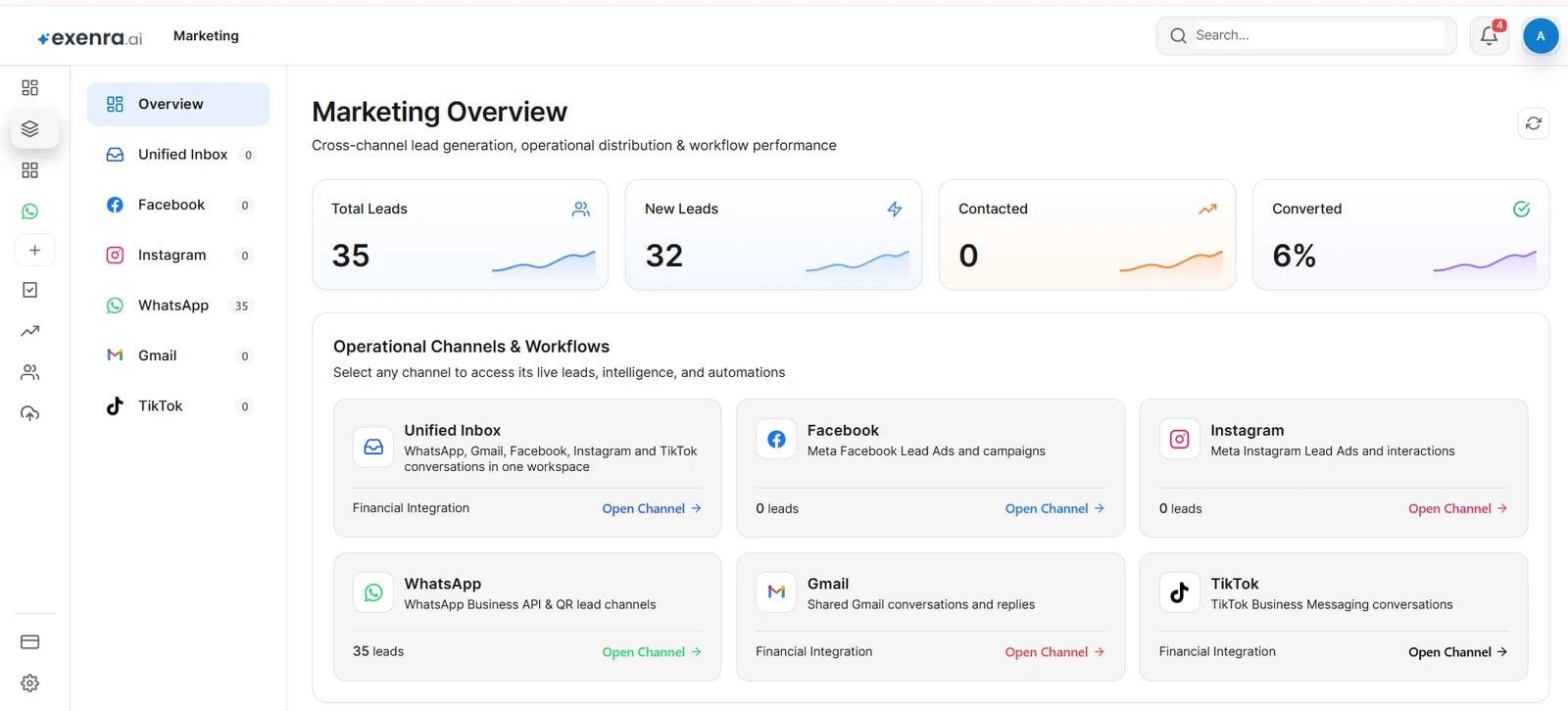
The Marketing Overview counts total, new, contacted and converted leads for each channel. The dashboard shows your top lead source and keeps website tracking from your own script separate from what the ad platforms report.
- Leads by channel, with new, contacted and converted counts.
- Top lead source on the dashboard.
- Website tracking kept apart from ad-platform reported data.
Questions about lead capture
About Lead Ads, assignment and reporting.
Can Exenra reply to Facebook Lead Ads automatically?
Lead Ads are forms, so there's no conversation to reply in. A workflow can send an approved WhatsApp template to the phone number on the form, if the lead agreed to WhatsApp contact, or create a call task for the owner.
What's the difference between Lead Ads and Messenger or Instagram DMs?
Lead Ads collect a form and create a lead. Messenger and Instagram DMs are conversations the customer starts, so your team replies in the same thread. Exenra handles both and records which one each lead came from.
Can leads be assigned automatically?
Yes. Use round robin within a team, or rules that assign by conditions such as city, product or form. Anyone can reassign a lead from the conversation.
How do we see which channel produces customers?
The Marketing Overview shows total, new, contacted and converted leads for each channel, and the dashboard shows your top lead source.
Can Exenra sync leads to our existing CRM?
Connections to other CRMs, such as Salesforce, HubSpot or Zoho, are scoped as projects around their APIs. The Integration Builder, which will handle simpler flows, is in development. Read about CRM integration.