Omnichannel Shared Inbox
A shared team inbox for WhatsApp, Instagram, Facebook and Gmail
Give your whole team one place to answer customers. Conversations from every connected channel arrive in one list, each with an owner and the customer's details beside the chat. TikTok Business Messaging joins the same list where TikTok approves your account.
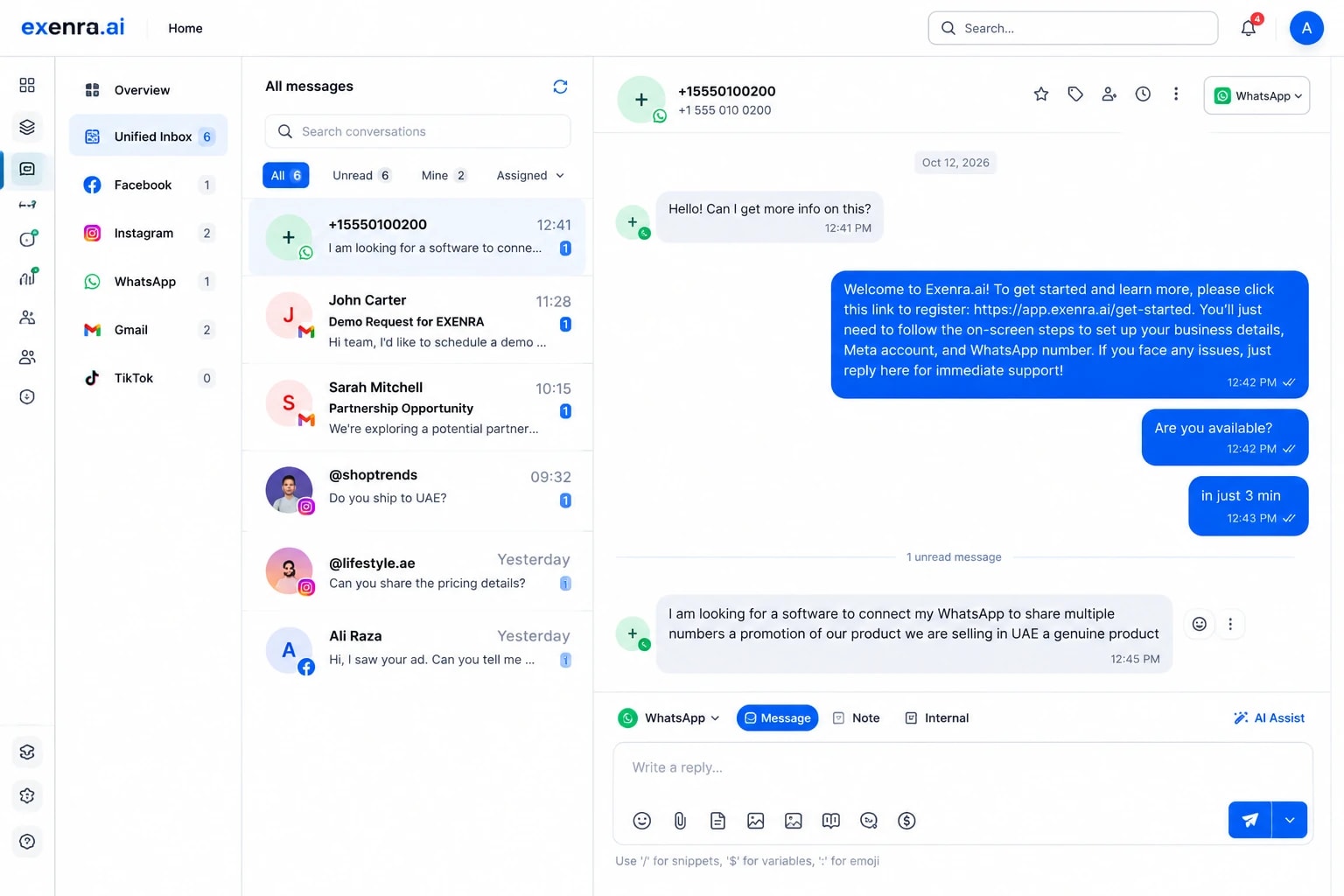
One list for every channel, one owner for every chat
A busy afternoon at an online clothing store in Karachi: a late delivery on WhatsApp, a sizing question on Instagram, shipping to Abu Dhabi on Facebook and a corporate order by email. One team handles all of it from the same screen.
Swipe sideways to see the full screen
Composer
A reply composer built for teams
Replies, notes and internal discussion happen in the same place, so the context stays with the conversation instead of in a separate chat app.
- Message, Note and Internal. Message goes to the customer. Note and Internal stay with your team, for context and for talking a case through.
- Type / for snippets. Saved answers for delivery times, exchanges or opening hours, inserted in a keystroke.
- Type $ for variables. Fill a saved reply with the customer's details instead of retyping them.
- AI Assist. Ask for help with a reply, then edit it before you send.
- Reply-channel selector. See which channel the reply goes out on, with emoji and attachments a click away.
Ownership you can see at a glance
A shared inbox only works when everyone knows which conversations are theirs. These are the controls your team will use every hour.
All, Unread, Mine, Assigned
Mine shows the conversations assigned to you. Assigned shows those that already have an owner, so chats without one stand out.
Assign to a person or a team
Use Assign in the conversation header, or Assign to Team from the contact panel when a whole team should pick it up.
Conversation status
Channel inboxes add a Closed view, so finished conversations leave the active list. WhatsApp analytics count open and expired conversations.
Convert to lead
When a chat turns into a sales opportunity, convert it and the contact moves into your CRM with the conversation attached.
Contact panel
The customer's details beside every chat
The contact panel shows who you're talking to before you reply: the page or account they wrote to, when they were first seen, when they last messaged and their lead status. Quick actions let you assign the conversation to a team, convert it to a lead or add it to a workflow without leaving the chat.
An inbox for each channel, too
Most teams work from the unified inbox. Each channel also has its own inbox with the tools specific to it, which helps when one person looks after Instagram or a particular WhatsApp number.
| Channel | Status | Its own inbox includes |
|---|---|---|
| WhatsApp Business API | Available | A number selector for several numbers, health status, the AI Assistant switch for each number, chats, campaigns, templates, analytics and history |
| Available | Business account DMs, connection status with a connection check, and All, Unread, Assigned and Closed filters. Instagram Lead Ads are counted separately as leads. | |
| Available | Messenger conversations for your connected Pages and a connection check. Facebook Lead Ads are counted separately as leads. | |
| Gmail | Early access | Several Gmail or Google Workspace mailboxes, an all-mailbox view, compose, sync, and Primary, Promotions, Social and Updates tabs |
| TikTok | Rolling out | Business Messaging conversations, webhook status and the campaign or video a lead inquired via |
Questions buyers ask
Can several teammates reply from the same WhatsApp number?
Yes, that's what a shared inbox is for. Your number is connected once through the official WhatsApp Business Platform, and teammates in the workspace work its conversations, with assignment showing who owns each one.
Do customers see notes or internal messages?
No. Only replies sent in Message mode reach the customer. Notes and internal messages stay inside Exenra for your team.
How do we stop two people answering the same customer?
Assign the conversation as soon as someone picks it up. Each person works from Mine, and the Assigned filter shows which chats already have an owner.
Can we connect more than one WhatsApp number?
Yes. A workspace can hold several WhatsApp numbers, chosen with the number selector, and the AI Assistant can be on for one number and off for another.
Is Gmail included?
Gmail is in early access. You can connect several Gmail or Google Workspace mailboxes. General availability depends on Google completing verification of the app's mail access.
We sell software. Can this inbox appear inside our product?
That is Exenra Embedded, which is in partner preview. See the embedded unified inbox.
Related pages
- AI Agents & ChatbotsLet an agent answer routine questions first
- Team ManagementRoles, assignment rules and workload
- CRM & Lead ManagementTurn conversations into leads with owners
- WhatsApp Business APIWhat the official API adds to the inbox
- Embedded Unified InboxFor software vendors adding an inbox to their product
- AI Customer SupportAnswer common questions, escalate the rest