AI Agents & Chatbots
A WhatsApp AI chatbot that knows when to hand over to your team
Train an AI agent on your price lists, policies and website, switch it on for the WhatsApp numbers you choose, and set clear rules for when a person takes over. Customers get quick answers to routine questions, and your team keeps the conversations that need judgement.
Training
Train your agent in three steps
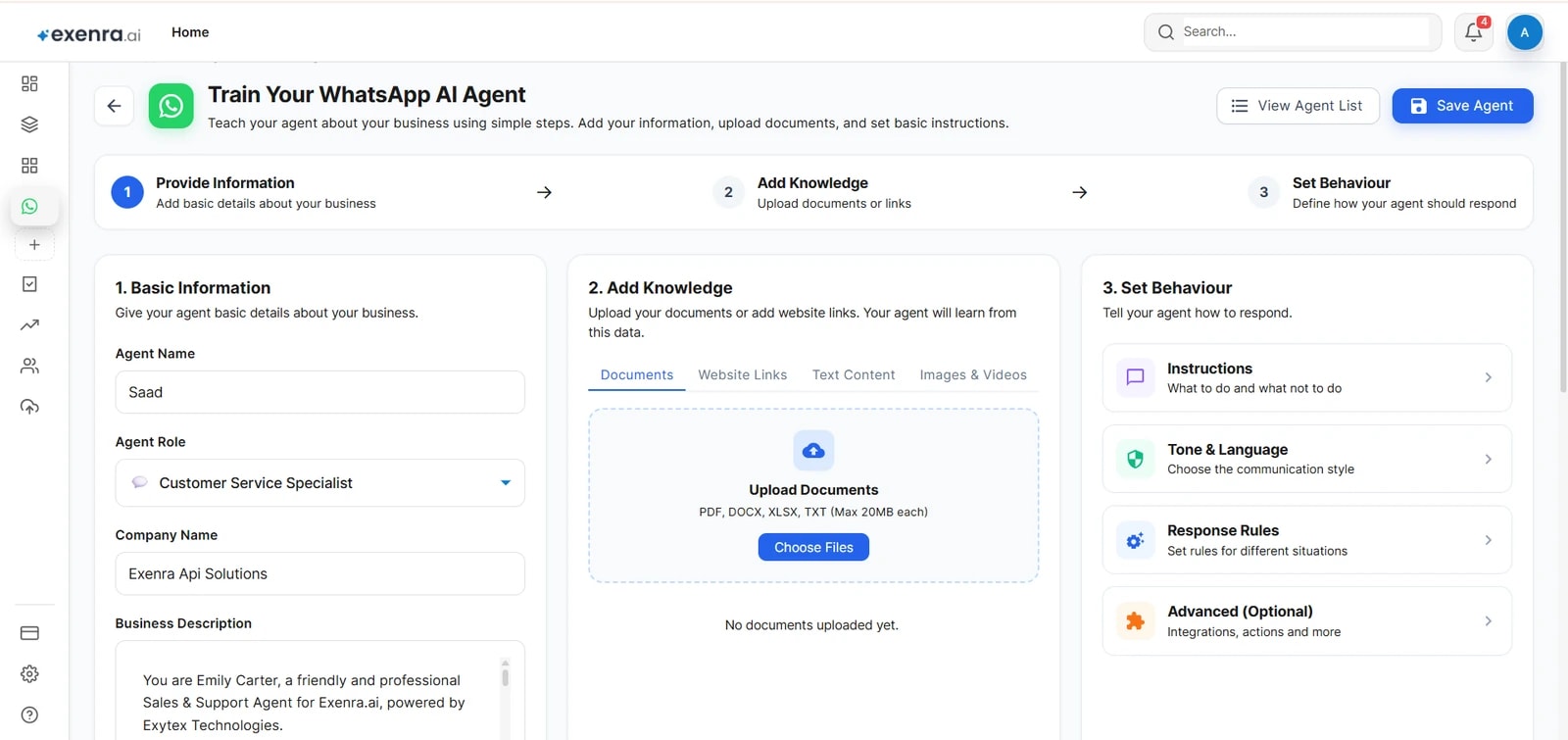
The set-up screen walks you through it in order. Come back to any step when your prices or policies change.
Provide information
Give the agent a name and a role, add your company name and describe what you sell and who you sell to.
Add knowledge
Upload PDF, DOCX, XLSX or TXT files up to 20 MB each, add website links, paste text, or add images and videos.
Set behaviour
Write instructions on what to do and what not to do, choose the tone and language, and add response rules for specific situations.
Knowledge
Answers come from your own material
An agent is only as good as what you give it. Start with the questions your team answers most often: prices, stock, delivery areas, opening hours, booking steps and returns. Keep one current document per topic and replace it when something changes.
- Documents: price lists, policies and FAQs in PDF, DOCX, XLSX or TXT.
- Website links: pages that already explain your products or services.
- Text content: short answers that don't live in any document yet.
- Images and videos: product photos and walkthroughs for the agent to learn from.
Per-number control
Switch the assistant on or off for each WhatsApp number
Many businesses run more than one number: a sales line, a service line, a number per branch. Turn the AI Assistant on where quick answers help, and leave it off where every reply should come from a person. A teammate can step into any conversation at any time.
Handoff rules
Decide where the AI answers and where it must not
Handoff works best when it's written down. Put these boundaries into the agent's instructions and response rules, then test them before you switch the agent on.
Good jobs for the AI agent
- Prices, stock and product details from your documents
- Delivery areas, timings and opening hours
- Booking steps, required documents and what happens next
- Collecting a name, area or order number before a person takes over
- Out-of-hours replies that say when the team is back
Hand these to a person
- Discounts, price exceptions and custom quotes
- Refunds, complaints and anyone who is upset
- Medical, legal or financial advice of any kind
- Payment problems, or anything involving card details
- Questions your knowledge sources don't cover
- Any time the customer asks for a person
The conversation gets an owner
Route the handed-over chat to a person or a team, so it lands in someone's queue instead of waiting in the open.
The full history comes along
Whoever takes over sees everything the customer and the agent said, so nobody asks the customer to repeat themselves.
People can step in early
A teammate can take over any conversation at any time, including ones the agent is handling.
Tokens
How AI usage is billed
AI usage in Exenra runs on tokens. Your workspace has a balance, and you can top it up inside the app with Buy Tokens. Meta's charges for WhatsApp messages are separate from AI tokens and from your Exenra plan.
Questions buyers ask
Will the AI agent reply to customers on its own?
Only on the WhatsApp numbers where you switch the AI Assistant on. There it answers from your knowledge sources and follows your instructions and response rules. On every other number, your team replies.
What does the agent do when it doesn't know the answer?
That is what your instructions and response rules are for. Tell it to say it will check with the team and pass the conversation to a person instead of guessing, then test a few unusual questions before you go live.
Can it reply in Urdu, Arabic or other languages?
You choose the tone and language in the Set behaviour step. Write your knowledge and instructions with those languages in mind, and test real customer questions in each one before you switch the agent on.
Can a clinic use it for patient enquiries?
For timings, locations and booking steps, yes. It must not give medical advice, and Exenra is not a clinical record system. Add a rule that hands any symptom or treatment question to your staff. Healthcare and clinics.
Does it work on Instagram and Facebook too?
The training screen and the on and off switch described here are for WhatsApp numbers. If you want AI replies on other connected channels, ask us what is available for your workspace.
How is AI usage charged?
AI usage runs on tokens that you buy inside the app. See pricing for plans. Meta's WhatsApp charges are separate.
Related pages
- Omnichannel Shared InboxWhere handed-over conversations land
- Workflow AutomationFixed rules for routing and follow-up
- AI Customer SupportAnswer common questions, escalate the rest
- Healthcare & ClinicsAppointment requests with strict handoff rules
- WhatsApp Business APINumbers, templates and the official API