Facebook Page messages and Lead Ads, managed by one team
Bring the Messenger conversations from your Facebook Pages into a shared inbox, and receive Facebook Lead Ads as leads with an owner. Your team sees who is handling what, and no message waits in a Page inbox nobody checks.
Page messages and Lead Ads, side by side
They both start on Facebook and they are often confused. A Lead Ad is a form, not a Messenger chat, so Exenra treats the two differently.
| Page messages | Facebook Lead Ads | |
|---|---|---|
| What the person does | Sends a message to your Page in Messenger, for example from your Page or a click-to-Messenger ad | Fills in a form inside an ad, without starting a chat |
| What arrives in Exenra | A conversation in the Facebook inbox and the Unified Inbox | A lead with the form answers and the campaign |
| How your team responds | Replies in the thread, assigns it and adds notes | Assigns an owner and follows up by phone, email or an approved WhatsApp template |
| Typical use | Questions, bookings and order help | Campaign enquiries such as quotes, call-backs, test drives and viewings |
| Managed on Facebook in | Your Page, through Meta Business Suite | Meta Ads Manager |
From a Page message to an owned lead
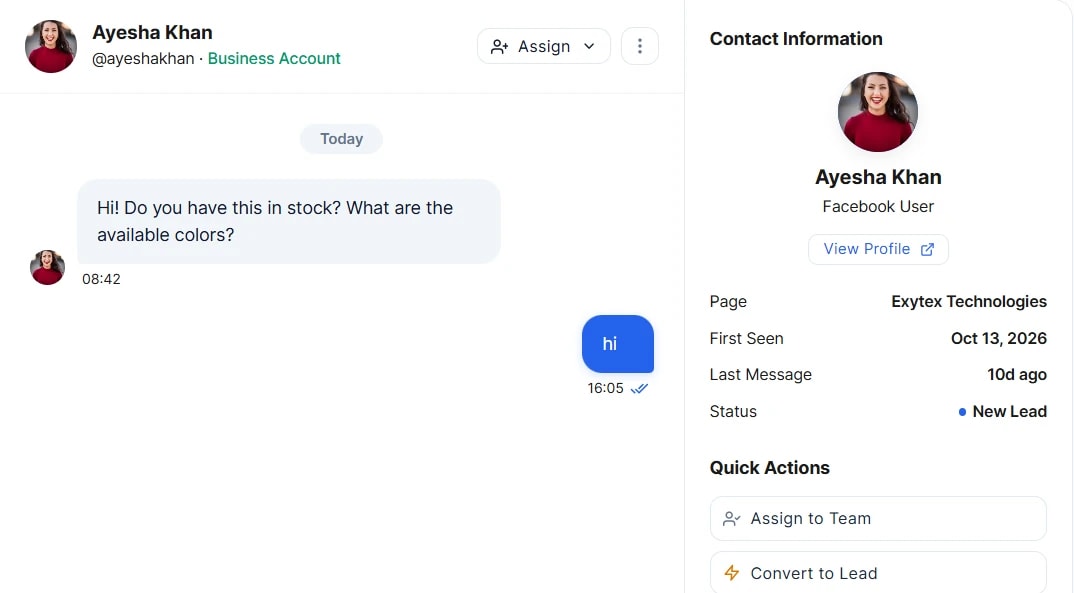
Every Facebook conversation in Exenra has the customer's details beside it and the actions your team needs next.
Assign
Give the conversation to a person, or to a team with Assign to Team, straight from the chat.
Convert to lead
Create a lead from the conversation with the chat attached, so the history follows the customer.
Add to workflow
Put the contact into a workflow that sets follow-ups, tags or routing.
Contact details in view
The Page, first seen date, last message and lead status sit next to every conversation.
Facebook Lead Ads
Lead Ads with an owner from the first minute
When someone submits a Lead Ad form, Exenra receives it as a lead and runs the rules you set. The lead is assigned, tagged and given a follow-up time, so the call happens while the person still remembers the ad.
- Match by form or campaign, so each enquiry goes to the team that sells it.
- Round-robin assignment to share leads fairly across a team.
- Follow-up tasks with times, visible to managers in the pipeline.
Connection
Connection checks and Page access
Facebook is connected by a person who manages the Page, through Meta's own sign-in. If that person loses their Page access, changes their password or removes Exenra's permissions, Meta stops sharing new messages. Check connection shows the state of each Page so you catch it early.
- Connect the Pages you manage and see each one's status.
- Reconnect from another admin when someone leaves the team.
- New messages arrive through Meta's webhooks, so conversations appear without refreshing.
Facebook questions
About Page messages, Lead Ads and Page access.
Is Facebook Lead Ads the same as Messenger?
No. Lead Ads are forms inside an ad. The person submits their details and no chat is created. Messenger conversations are messages sent to your Page. Exenra receives Lead Ads as leads and Page messages as conversations.
Do conversations from click-to-Messenger ads come in?
Yes. A click-to-Messenger ad opens a chat with your Page, so those conversations arrive in the Page inbox like any other message.
Who needs to connect the Page?
A person with full control of the Page in Meta's tools. They sign in with Meta, choose the Pages and approve the permissions. Nobody shares a password with Exenra.
Can we connect more than one Page?
Yes. Connect the Pages you manage and each one shows its own connection status. Agencies handling Pages for several clients should talk to us about how to organise workspaces.
Why did Facebook messages stop arriving?
Usually because the person who connected the Page lost access, changed their password or removed permissions. Run Check connection, then reconnect from an account that still manages the Page.