Messaging channels in Exenra, and what each one covers today
Exenra brings WhatsApp, Instagram, Facebook, TikTok and Gmail conversations into one shared inbox. Each channel connects through its own official business platform, so what you can do on it depends on that platform's rules. This page shows where each one stands.
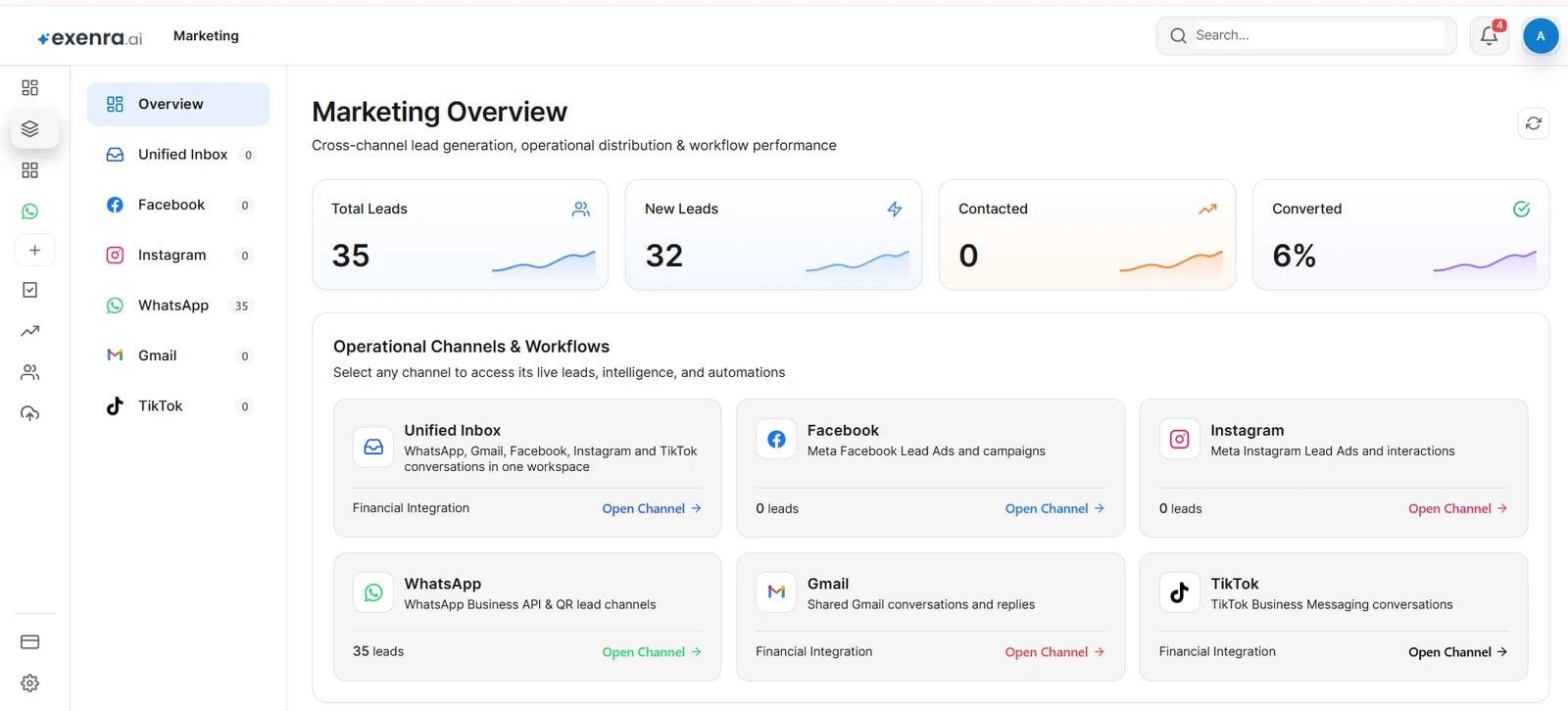
Channel status at a glance
The same status labels are used across this site, so a channel marked available here is available on every page.
| Channel | Status | What it covers today |
|---|---|---|
| WhatsApp Business API | Available | Two-way messaging, templates, campaigns and analytics |
| Available | Business DMs and Lead Ads | |
| Available | Page messages and Lead Ads | |
| TikTok | Rolling out | Business Messaging, subject to TikTok eligibility |
| Gmail | Early access | Shared Gmail and Google Workspace mailboxes |
Three jobs a channel can do, and how they differ
Buyers often mix these up when comparing tools. They come from different parts of each platform and behave differently in Exenra.
Two-way messaging
A customer writes to your WhatsApp number, Instagram account, Facebook Page, TikTok account or mailbox, and your team replies in the same thread. These conversations land in the shared inbox, where they are assigned, noted and converted to leads.
Lead capture with Lead Ads
Facebook and Instagram Lead Ads are forms inside an ad. The person sends their details without starting a chat. Exenra receives the submission as a lead with the campaign attached, and your team decides how to follow up.
Ad analytics
Reach, clicks and spend belong to each ad platform's own reporting. Exenra reports on what happens after a lead or message arrives, such as leads by channel, response times and conversions. Website tracking from your own script is kept apart from ad-platform data.
Which jobs each channel covers in Exenra
| Channel | Two-way messaging | Lead capture |
|---|---|---|
| WhatsApp Business API | Chats, approved templates and campaigns | QR lead channels, and chats converted to leads |
| Direct messages to your professional account | Instagram Lead Ads | |
| Page messages (Messenger) | Facebook Lead Ads | |
| TikTok | Business Messaging, where TikTok approves the account | Chats converted to leads, with campaign context (Inquired via) |
| Gmail | Shared Gmail and Google Workspace mailboxes |
Connecting a channel
Each business connects its own accounts
Exenra never needs your passwords. The owner or an admin of each account signs in with the platform itself, approves what Exenra may access, and can remove that access later from the platform's own settings.
Open the channel in Exenra
Choose the channel and start the connection from your workspace.
Sign in with the platform
Meta, TikTok or Google shows its own consent screen. You approve the permissions there.
Choose what to connect
Select the WhatsApp number, Facebook Page, Instagram account, TikTok account or mailbox.
Check the connection
New messages start arriving. Check connection on each channel confirms the link is healthy.
What each business needs before connecting
| Channel | How the business connects it | What the business needs |
|---|---|---|
| WhatsApp Business API | Meta's onboarding, started from inside Exenra | A Meta business portfolio, a phone number that can receive a verification code, and a display name Meta can approve |
| Sign in with Meta and choose the account | An Instagram professional account you manage | |
| Sign in with Meta and choose the Pages | Full control of each Facebook Page you connect | |
| TikTok | Sign in with TikTok and approve access | A TikTok business account approved for Business Messaging in a supported region |
| Gmail | Sign in with Google, one mailbox at a time | A Gmail or Google Workspace mailbox enabled for early access |
Why some channels need platform approval
Messaging platforms protect their users from spam, so they review businesses and the software that connects to them. These checks are set by the platforms, and they are the main reason a channel can be live for one business and pending for another.
Meta reviews WhatsApp senders and messages
Display names are checked against Meta's guidelines, templates are approved before use, and Meta may ask for business verification, for example before raising how many customers you can message.
Platforms review the software as well
Exenra's own access to each platform's messaging features goes through that platform's app review. This is separate from your account, and it is why a new channel can take time to reach every workspace.
TikTok decides by account and region
TikTok Business Messaging is offered to business accounts TikTok approves, in the regions where it runs the feature. We check eligibility with you before you rely on it.
Google verifies apps that read mail
Apps that read and send Gmail must pass Google's verification of their mail permissions. Completing it is part of moving Gmail in Exenra from early access to general availability.
Questions about channels
Short answers about status, approval and connecting accounts.
Which channels can we connect today?
WhatsApp Business API, Instagram and Facebook are available to every workspace. TikTok Business Messaging is rolling out to accounts TikTok approves, and Gmail is in early access.
Do all channels share one inbox?
Yes. Conversations from every connected channel appear in the Unified Inbox, with filters for All, Unread, Mine and Assigned and a selector for the channel you reply on. Each channel also keeps its own inbox view and settings.
Is a Lead Ad the same as a message?
No. A Lead Ad is a form the person fills in inside an ad on Facebook or Instagram, and it arrives in Exenra as a lead with no chat attached. Your team then follows up by phone, email or an approved WhatsApp template where the person agreed to be contacted.
Who connects the accounts, us or Exenra?
Your business does. The account owner or an admin signs in with Meta, TikTok or Google and approves access. We guide you through it during onboarding, and nobody shares a password with us.
Why is a channel live for some businesses and not others?
Platforms approve accounts individually. TikTok approves business accounts by region, Meta reviews WhatsApp display names and templates, and Google verifies apps that access mail. We confirm what applies to you before you plan a launch around it.
Can we connect more than one WhatsApp number or mailbox?
Yes. A workspace can hold several WhatsApp numbers, each with its own health status and AI assistant setting, and several Gmail or Google Workspace mailboxes in separate slots.