TikTok direct messages, answered from your team inbox
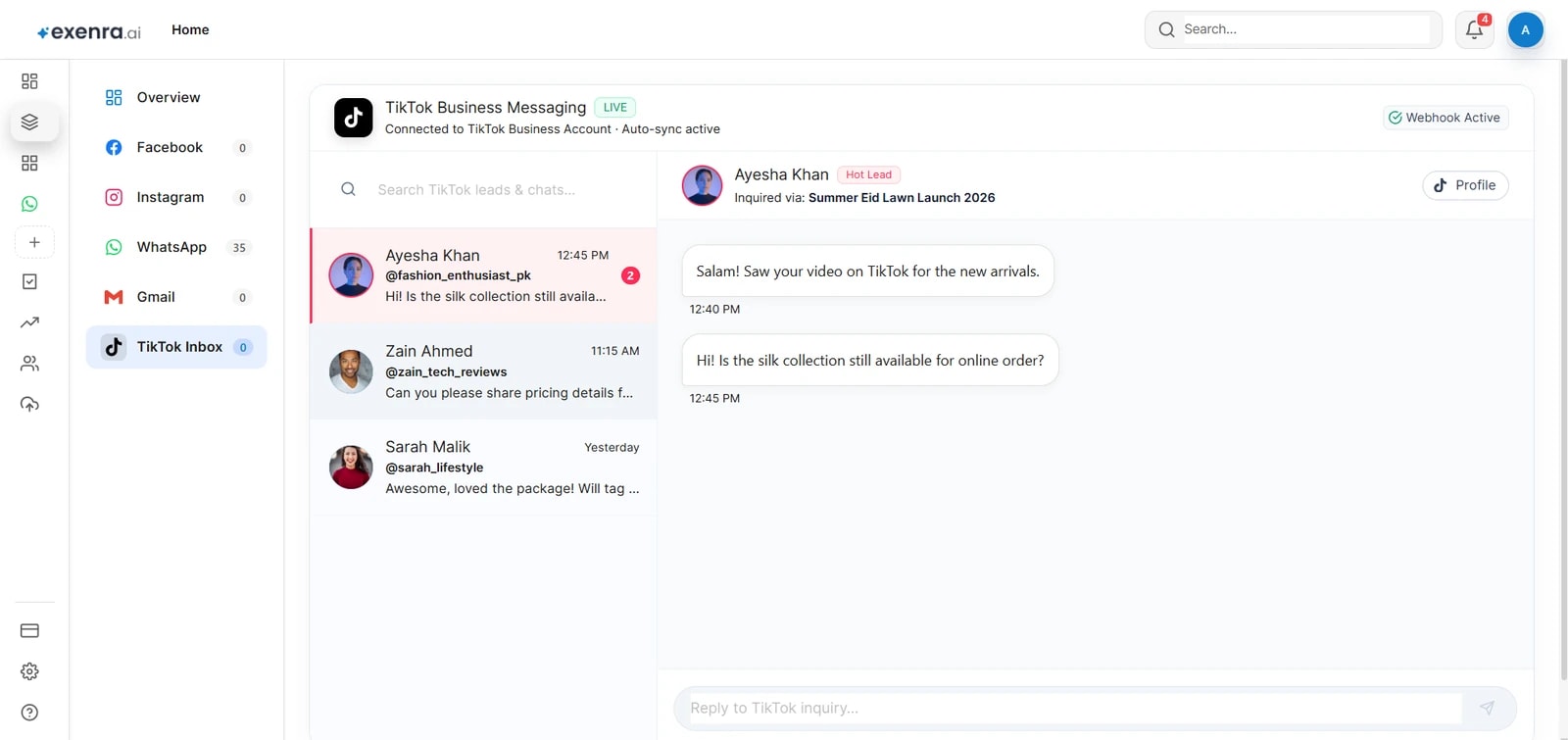
When TikTok approves your business account for Business Messaging, the people who message you after a video or an ad can be answered in Exenra, next to WhatsApp and Instagram. Each chat shows the campaign the person enquired through.
Availability depends on TikTok
TikTok Business Messaging is offered to business accounts TikTok approves, in the regions where TikTok provides it. That is why this channel is marked as rolling out.
Check eligibility
We look at your business account and region with you before anything else.
TikTok approval
TikTok decides whether your account can use Business Messaging. The timing and criteria are TikTok's.
Authorise Exenra
An admin of the TikTok business account signs in with TikTok and approves access.
Webhook active
TikTok starts sending new messages to Exenra, and the inbox shows the webhook as active.
TikTok ads and TikTok messages are separate products
TikTok runs advertising, lead generation forms and messaging as different products. The TikTok channel in Exenra covers direct messages.
| What it is | Where it is managed | In Exenra | |
|---|---|---|---|
| TikTok ads | Videos you pay to promote to an audience | TikTok Ads Manager | The campaign or video a person enquired through can appear on their chat as Inquired via |
| Lead generation forms | Forms inside an ad that collect contact details | TikTok Ads Manager | Not part of the TikTok messaging channel. Ask us if you need form leads in Exenra. |
| Direct messages | One-to-one chats between a person and your business account | TikTok Business Messaging | Conversations in the TikTok inbox and the Unified Inbox |
Campaign context
Know which video or campaign started the chat
TikTok enquiries often follow a specific post. Exenra shows that context on the conversation as Inquired via, so whoever replies knows which product or offer the customer saw, and managers can see which content brings real conversations.
- Inquired via shows the campaign or video context TikTok provides.
- Tags such as Hot lead help the team decide what to answer first.
- Assignment and lead conversion work the same way as on every other channel.
Connection
Webhook status you can check
New TikTok messages reach Exenra through a webhook, a notification TikTok sends each time someone writes. The TikTok inbox shows whether the webhook is active and whether auto-sync is running, so a quiet inbox never hides a broken connection.
- Webhook active means TikTok is delivering new messages.
- Auto-sync keeps the conversation list up to date.
- Reconnect from the account admin if TikTok revokes access.
TikTok questions
About eligibility, ads and direct messages.
Is TikTok messaging available for every business?
No. TikTok approves business accounts for Business Messaging and offers it in selected regions. We check your account and region with you, and the channel stays marked as rolling out until it is broadly available.
Can Exenra capture leads from TikTok lead generation forms?
The TikTok channel in Exenra covers direct messages. Lead generation forms are a separate TikTok ads product. If you need form leads in Exenra, talk to us about your set-up.
What does Inquired via mean?
It is the campaign or video context attached to a TikTok conversation, shown on the chat so your team knows what the person saw before writing.
Do we need a TikTok business account?
Yes. Business Messaging works with TikTok business accounts, connected by someone who can manage the account.
What if the webhook shows as inactive?
New messages may not be arriving. Run a connection check and reconnect from the business account if TikTok has revoked access. If it stays inactive, contact us and we'll look at it with you.